

| Assistive Technology There are stacks of products available to assist the learner. Many have been developed to support people who have a learning challenge of some kind, but are of worth to all. Here we present a few that www.gerardkeegan.co.uk has come across. A number of Schools, Colleges and Universities in Scotland now have these or similar available to students as a consequence of the Disability Discrimination Act. Every student should be made aware of what is available, and if you are eligible for this type of kit. If you aren't made aware of what assistive technology could benefit you see whoever delivers Learning Support in your institution. The AlphaSmart Note Taker 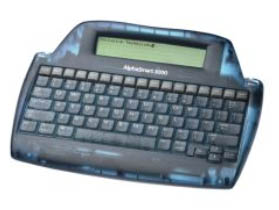 The AlphaSmart allows you to enter and edit text, then send it to a computer for
formatting or directly to a printer. It is ideal for students who need access to
word processing to support writing. Very portable it is ergonomically designed
with a full size, 80 key keyboard weighing only 840 grams with an easy to read,
4-line by 40-character LCD display. The AlphaSmart allows you to enter and edit text, then send it to a computer for
formatting or directly to a printer. It is ideal for students who need access to
word processing to support writing. Very portable it is ergonomically designed
with a full size, 80 key keyboard weighing only 840 grams with an easy to read,
4-line by 40-character LCD display.You can cut, copy and paste within and between files. It holds 100 pages of text in eight files. The 3000 has an improved, faster spell-checker than previously. It has password protection, foreign language support and keyword search. Special features for special needs include sticky keys and keyboard repeat control. It has a USB port, compatible with both Windows and Mac. If your computer doesn't have a USB port AlphaSmart can also supply PS2 or ADB leads. Three AA batteries included which give over 300 hours use. Further details can be got from http://www.jacksontechnology.com/jackson%20technology%20alphasmart.htm Note - The above link will open in a new window, but if you have pop up blocking software in operation, you may have to manually copy and paste the URL into your address bar. Or alternatively deactivate your pop up blocking software for this site. The same applies to all the links in this page. Dragon Naturally Speaking  Dragon Naturally Speaking is the product name of some useful speech to text software available from
http://www.caere.com/naturallyspeaking/ Dragon Naturally Speaking is the product name of some useful speech to text software available from
http://www.caere.com/naturallyspeaking/In its 7th stage of evolution, DNS is a fast, easy and accurate way to turn speech into text. Users can dictate into virtually any windows-based application at speeds up to 160 words per minute. Dragon Naturally Speaking is very valuable for professionals who create documents themselves or dictate transcriptions. Great for disabled PC users wanting to maximise the productivity of their PCs, and home users who want to have fun with their computers! (Note - with text to speech, it may be a good idea to try it before purchase. I've yet to see it work well with the Scottish accent. I am going to try and get a trial edition, so that I can give you an accurate assessment of the products actuall performance. - Graeme) MindManager X5 Pro 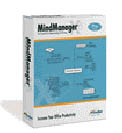 Mindjet produce MindManager X5 Pro. At its simplest level it is software that helps
you convert information and ideas into quality visual aids, such as mind maps. This greatly
aids current learning and later memory recall. Mindjet produce MindManager X5 Pro. At its simplest level it is software that helps
you convert information and ideas into quality visual aids, such as mind maps. This greatly
aids current learning and later memory recall.To appreciate the numerous applications of MindManager X5 Pro a free 21-day download is available from Mindjet at http://www.mindjet.com/uk/products/mindmanager_x5pro/index.php ZoomText  ZoomText is particularly useful for those with low vision. It is a screen magnification software
package with a built in document reader. ZoomText is particularly useful for those with low vision. It is a screen magnification software
package with a built in document reader.If you think this might benefit you or you want to learn more about ZoomText go to http://www.aisquared.com/Products/Products.htm To get a free trial download of ZoomText click Here Texthelp Read And Write Gold  Texthelp Read And Write Gold is the 'one stop solution' for reading and writing needs, offering
an extremely comprehensive set of support features available to the User with literacy or learning
difficulties. It is a floating toolbar that boasts a huge range of helpful features. Including: Texthelp Read And Write Gold is the 'one stop solution' for reading and writing needs, offering
an extremely comprehensive set of support features available to the User with literacy or learning
difficulties. It is a floating toolbar that boasts a huge range of helpful features. Including:Speech - With Read & Write (v7) GOLD text can be read back by each word, sentence, paragraph, selected text or spoken as the User types. Read & Write (v7) GOLD is compatible with Microsoft SAPI 4 and 5 speech technology and comes with a choice of 34 different voices including British and American accents. The voices can be adjusted to suit the individual requirements of the User by altering the pitch, speed, volume and/or word pause. RealSpeak® provides the most human-sounding voice available today. Words can also be highlighted as they are spoken for audio-visual reinforcement, increasing word recognition levels. Screen reading of on-screen text, menus and icons is also included. Spell Checking - Read & Write (v7) GOLD has an advanced Phonetic Spellchecker to analyse and correct spellings. The User can choose to spell check as they type or check their completed work. Any spelling mistake will be identified and the Spellchecker window will provide a list of suggested corrections with the meanings of each to aid the correct choice. Colour coded identification of errors helps the User to identify their mistakes. The phonetic spell checker assists the User in correcting the most complex of errors. All spelling suggestions and dictionary definitions can be spoken. An error log gives the educator the opportunity to monitor an individual User's progress. Specialised dictionaries are also included. The latest spell checking facility provided has an improved ability to suggest the word a User is looking for. This improvement in the probability of suggested words is likely to further assist the User in their aim to produce a high standard of work. Homophone Support - To eliminate the confusion of like sounding words (homophones), the package provides colour coding of confusable words and lists possible alternatives with audible definitions and sample sentences. Read & Write (v7) GOLD has an improved homophone database with the option to select from basic or advanced homophone suggestions, further enhancing the suggestions relevance to the User. 1400 homophones are listed in the homophone database. The Same Sounding Words Panel shows the list of words that can be confused and a definition for each to help the User find the right word every time. By identifying and providing audible definitions of homophones Read & Write (v7) GOLD ensures helps the User identify the correct word in the correct context. Word Prediction - enables the User to develop their writing skills by providing the tools to construct sentences with ease. It learns the Users style of writing and predicts the word they want to use next! It also incorporates a prediction database based on a 100 million-word corpus, thus as you type, a list of suggestions will appear in the Prediction Panel. The Word Prediction feature has seen great improvements in speed of processing and suggestion accuracy in comparison with previous versions. It now enables Users to select from one of thirty two context specific prediction files, such as Arts, Beliefs and Books. This further enhances the relevance of the suggestions made for the User. Users can also edit the contents of their custom dictionary and can edit the prediction suggestions to better suit their requirements. Indicators beside each word show context accuracy. This means Users will be less likely to make a grammatical error so increasing the quality of their work. Web Highlighting - The new Web highlighting feature allows the User to experience dual colour highlighting with audible feedback in HTML documents. This is of particular use for Users with literacy difficulties when accessing information online and also aids the Users concentration and comprehension. Daisy Reader - The DAISY Standard for Digital Accessible Documents is an open worldwide specification that revolutionizes the reading experience for people who are blind or print disabled. Read&Write (v7) GOLD contains Daisy Reading technology and allows Users to read their Daisy Books while working within the Read&Write program. An added feature incorporated in the Daisy Reader is a dual colour highlighting option. Dual colour highlighting allows Users with disabilities such as dyslexia to enjoy their reading experience in a format and style they are comfortable with. Dictionary - 180,000 words are provided with alternative suggestions, thus developing the User's creative writing skills. Each word has a description and sample sentence, all of which can be spoken. Read & Write (v7) GOLD now includes the Collins Dictionary and new setting options enabling the User to choose simple or advanced definitions of words, allowing even higher levels of understanding for Users of all ages. Scientific Calculator - Read&Write (v7) GOLD has an easy to use Simple and Scientific Calculator. The calculator provides Users with the most common functions associated with a Simple or Scientific Calculator and also provides an audit trail so that each User can see their calculations as they go. The calculator is capable of evaluating equations within the document the User is working in and can also complete conversions of time, distance etc. Word Wizard - The Word Wizard acts as a thesaurus for those times when you are "lost for words". It takes Users from the word they know to the word they want. The word wizard provides a great choice of alternative words and provides a list of linking words. Each of the descriptions and sample sentences can be read to help the User find the word they want to use. This feature increases vocabulary, understanding and efficiency. Teachers' Toolkit - An Educator can control which features of Read & Write (v7) GOLD a student has access to. A simple to use interface allows the creation of profiles, which can be applied to an individual or group of students. A typical example would be the creation of an "exam" profile, which would restrict the functionality of the software during an exam. With more and more impetus for providing support within the exam or assessment environment, the toolbar provides a new resource for choosing which features are active in the program whilst still allowing the students to have reading and writing support. Other key features of Texthelp Read And Write Gold include Scanning; Speech Maker; Pronunciation; Clipboard History; Fact Folder and Fact Finder functionality. Further details are available from http://www.barrybennett.co.uk/software/screenreading/texthelp_gold.htm
|












Research into dyslexia and Myers-Irlen syndrome suggests that changing the background colour upon which words are written can often benefit the reader. If you feel this applies to you please select your preferred colour from the DMI EasiReader © below.
Click here to go to the DMI EasiReader information page


[
Sign
my Guestbook] - [Read
my Guestbook ]